Put the fees in view
Compare percentage fees, processing costs and fixed fees side by side. All rate inputs are editable.
 Sidekick Sheets
FREE PLATFORM FEE CALCULATOR
Before you set your price, see what fees and costs could leave you. Compare estimated fees, profit and margin across selling platforms in one simple spreadsheet.
Tested in Google Sheets and Excel for Windows · Spreadsheet + Quick-Start PDF
See the calculatorYOUR FREE DOWNLOAD
Get the Platform Fee Calculator and a short guide to making it your own.
Free download. No purchase required.
Compare percentage fees, processing costs and fixed fees side by side. All rate inputs are editable.
Enter your sale price, item cost and shipping cost to see estimated profit and margin for each platform.
See the break-even price and the price needed for your target margin, based on the costs and rates you enter.
A LOOK INSIDE
Rows for Etsy, eBay, TikTok Shop, Shopify, Gumroad and Lemon Squeezy, plus a custom platform row.
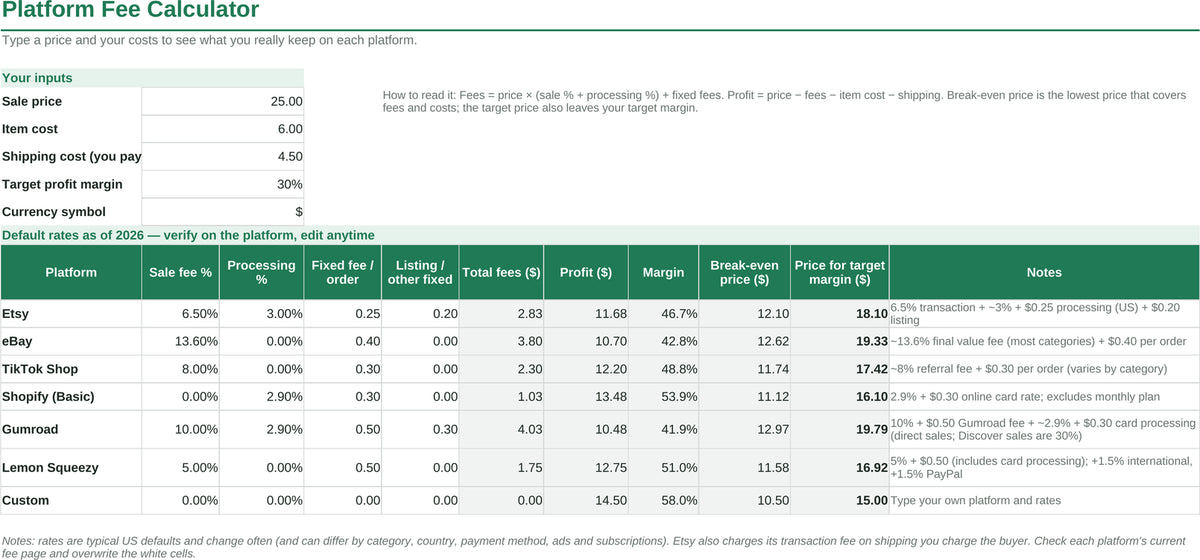
Platform fees vary by country, category, account, payment method and plan, and may change. Check the current rates with each platform and update the sheet. Include extra costs such as ads, currency conversion, regional fees and monthly plans when they apply.
Enter your email above, then follow the confirmation link to download the spreadsheet and Quick-Start guide.
Open the .xlsx file in Excel, or upload it to Google Drive, open it and choose File → Save as Google Sheets. Start on a computer for a clearer view.
Type your price and costs into the white cells, check and update the fee rates, then read the calculated results in gray.
Yes. The calculator spreadsheet and Quick-Start PDF are free, with no purchase required. Signing up also adds you to Sidekick Sheets emails about side-hustle tips and products. You can unsubscribe any time.
No. The sheet contains editable defaults as of 2026. Platforms can change their rates, and fees vary. Check the current fee pages for your country, category, account and payment method before relying on an estimate.
It is a downloadable .xlsx spreadsheet with a PDF guide, tested in Google Sheets and Excel for Windows. You enter your own numbers. It does not connect to your shop or automatically update fee rates.
Check your spam or promotions folder and make sure you entered the correct address. If you still need help, email hello@sidekicksheets.com.
Get the free sheet and see what your own numbers say.